
Reporting an issue on site
Spot something wrong with a unit? Report Issue for this Unit logs it against the job immediately, with a photo if it helps.
Walkthrough
Three steps to log an issue.
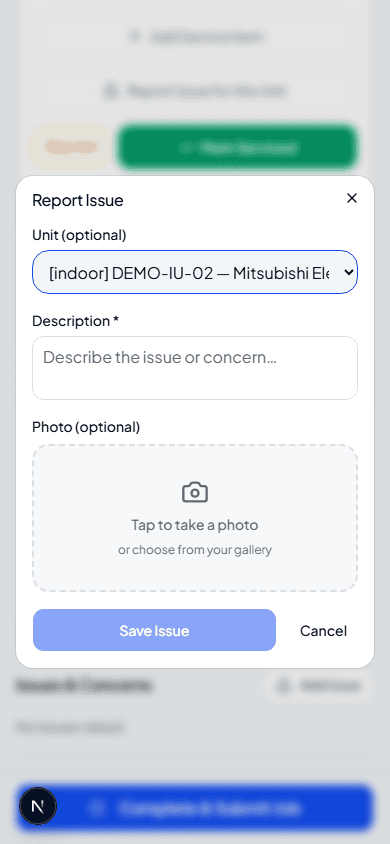
Report Issue for this Unit
Every unit on the checklist has its own Report Issue for this Unit button — it opens with that unit already selected, or choose General if it's not about one specific unit.
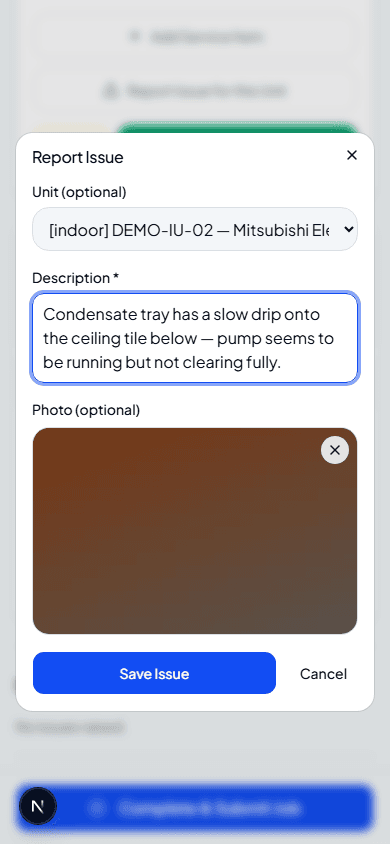
Describe it and add a photo
A clear description is required; a photo is optional but makes it much easier for the admin — and the customer, if it's shared later — to understand what you found.
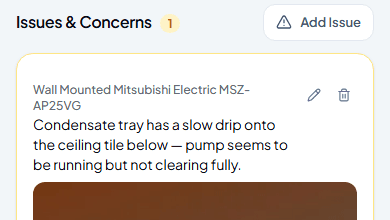
It's logged straight away
Save Issue adds it to Issues & Concerns on the job immediately — you don't need to wait until you submit the whole job for it to be recorded.
Frequently asked
Does reporting an issue stop me finishing the rest of the job?
No — it's completely independent of the checklist. Report as many issues as you find and carry on servicing the rest of the units.
Can I edit or delete an issue after saving it?
Yes, while it's still your job — the pencil and bin icons next to each issue let you edit the description and photo or remove it entirely.
What happens to issues after I submit the job?
They go to the admin for review alongside the rest of your submission — covered in Reviewing engineer-raised issues.
Experience Climexa with a free 30-day trial.
See how installation, commissioning, servicing, compliance and customer reporting work together in one platform.
- 30-day free trial
- No credit card required
- Full platform access