
Understanding units and refrigerant history
Every unit has its own page — specs, every refrigerant transaction it's ever had, and every service it's been part of.
Walkthrough
Three things you'll find on any unit's page.
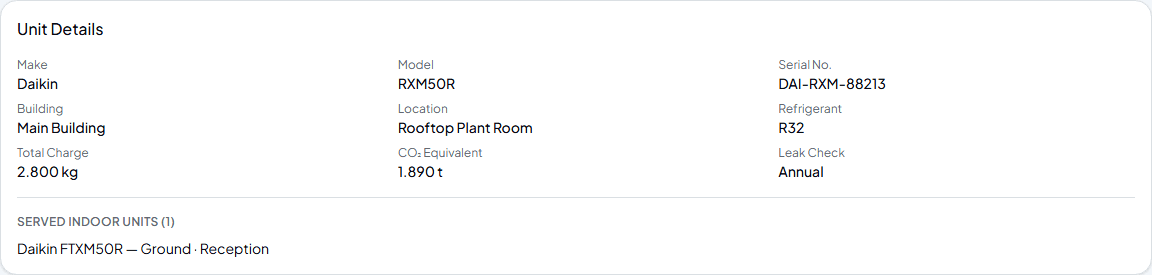
Open a unit's own page
From a customer's Sites & Units tab, click any unit to see its full record — make, model, serial number, location, and for outdoor units, refrigerant, total charge and CO₂ equivalent worked out automatically.
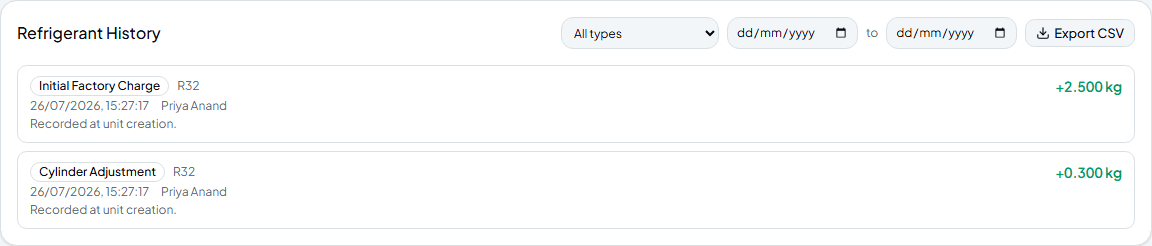
See the full refrigerant history
Outdoor units get a complete transaction log — the initial factory charge, every adjustment since, who recorded it and when. Filter by type or date range, or export the lot as CSV for your own records.

Check its service history
Every job that touched this specific unit, not just the site generally — what was checked, any notes, and any issues raised against it specifically.
Frequently asked
Where does the initial factory charge entry come from?
It's recorded automatically the moment you add the outdoor unit and enter its factory charge — you don't need to log it separately.
Does indoor unit history work the same way?
Indoor units get the same Service History section, but refrigerant transactions live on the outdoor unit — that's where the shared circuit's charge is actually tracked.
What's the CSV export useful for?
Handing a refrigerant record to a customer or auditor outside the app, or keeping your own backup of a unit's full history.
Experience Climexa with a free 30-day trial.
See how installation, commissioning, servicing, compliance and customer reporting work together in one platform.
- 30-day free trial
- No credit card required
- Full platform access